Check your TikTok app install campaigns against best practices
Reads your TikTok app campaigns and checks budget, cost, creatives and learning phase, then lists what to fix by hand.
Updated
- Free
- Ready in one click
- Needs a TikTok Ads connection
- 1
Download skill
Click the button
- 2
Add to your assistant
A few steps below
- 3
Paste a prompt
Fill in, get your answer
From guesswork to a clear answer
You get the daily budget compared with the developer's rule of thumb (50 times cost per install, 20 or 30 times cost per action).
Before: You are not sure if your app campaign budget is big enough to run well.
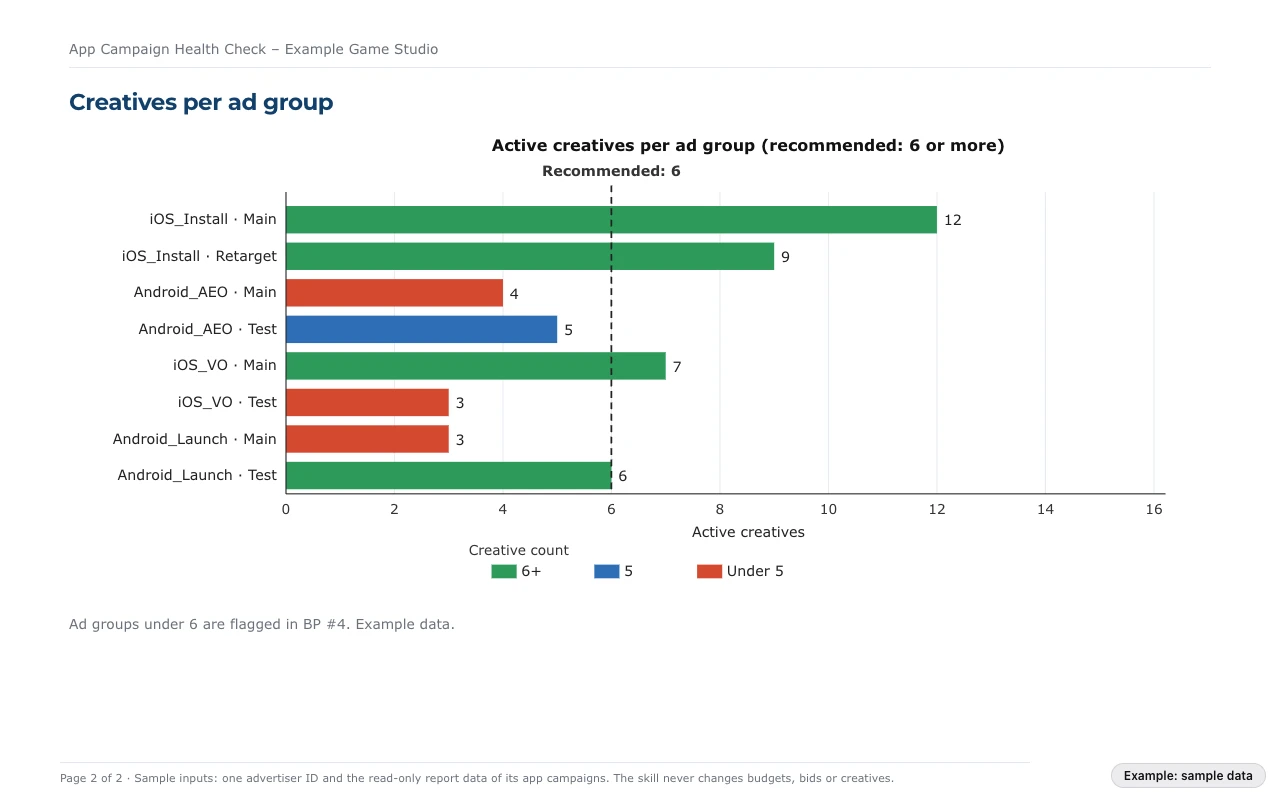
You get a check of creative count, creative fatigue signals and the last two days of spend and cost trends.
Before: Your cost per install went up and you cannot tell if tired creatives are the cause.
You get a clear pass or not-yet on the learning phase, with a low-confidence label when the data is thin.
Before: You want to scale a campaign but do not know if it has finished learning.
Made for
- Mobile game and app advertisers running TikTok app install, in-app event or value campaigns
- Marketers who want a regular health check on Smart+ app campaigns
- Teams who want a written list of fixes before they change budgets or creatives
Not made for
- Advertisers with no TikTok app promotion campaigns: it finds nothing to check
- Anyone who wants the skill to change budgets, bids or creatives for them: it only reads
- Advertisers whose app campaigns are not the upgraded Smart+ kind
What you need
- AI assistantAn AI assistant that lets you add skills.
- Account or accessA connection from your AI assistant to your TikTok Ads account (a tool link, often called an MCP server) that can read your campaigns and reports. It only reads: it can look at your account but is written never to pause, edit or upload anything. Setting up this connection can be tricky; the Ecomdy team can help you set it up.
- Your numbersYour TikTok Ads advertiser ID (a long number). Optionally a platform filter (iOS or Android), a minimum spend to skip tiny campaigns, and your target cost per install or per action so costs can be judged against it.
- Optional extra · optionalThe app campaigns should have run for a few days. Campaigns under 7 days or under 50 installs or events are marked low confidence.
Replace the [brackets] with your own details, then paste it into your AI assistant.
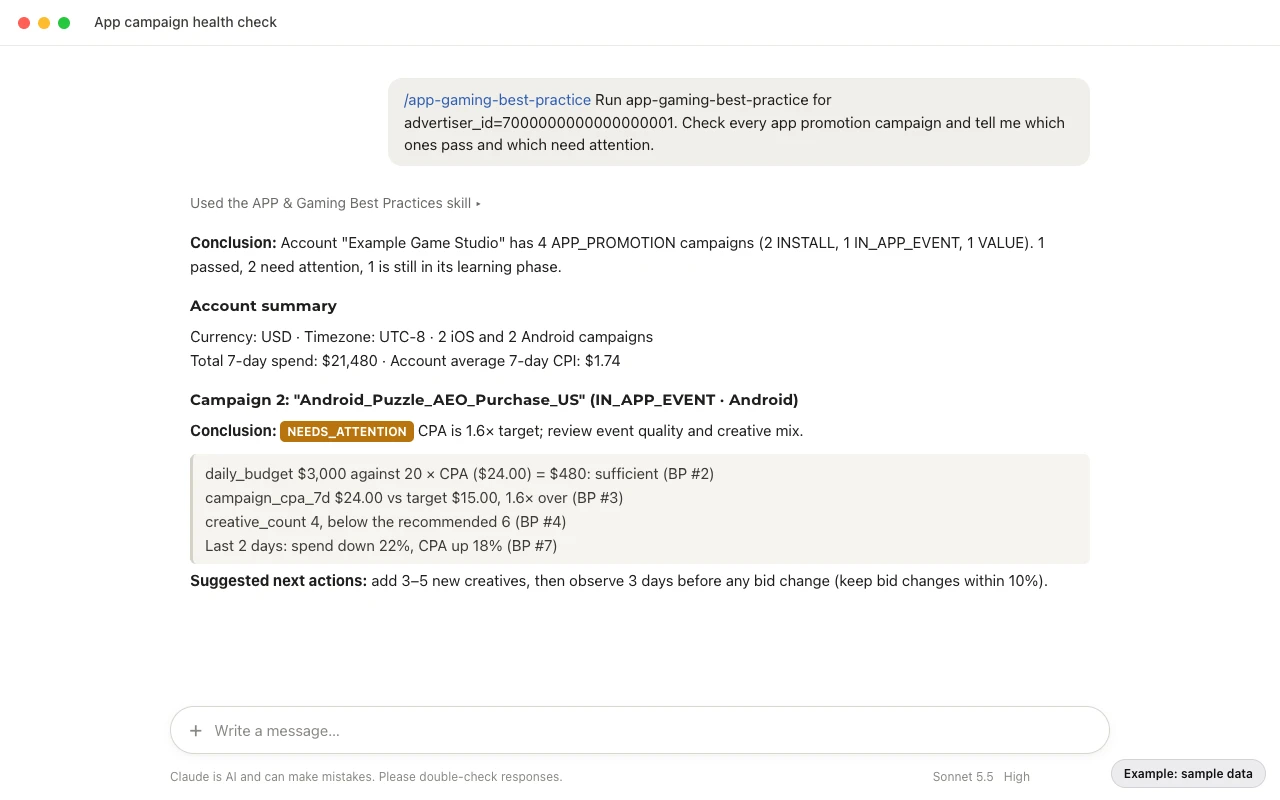
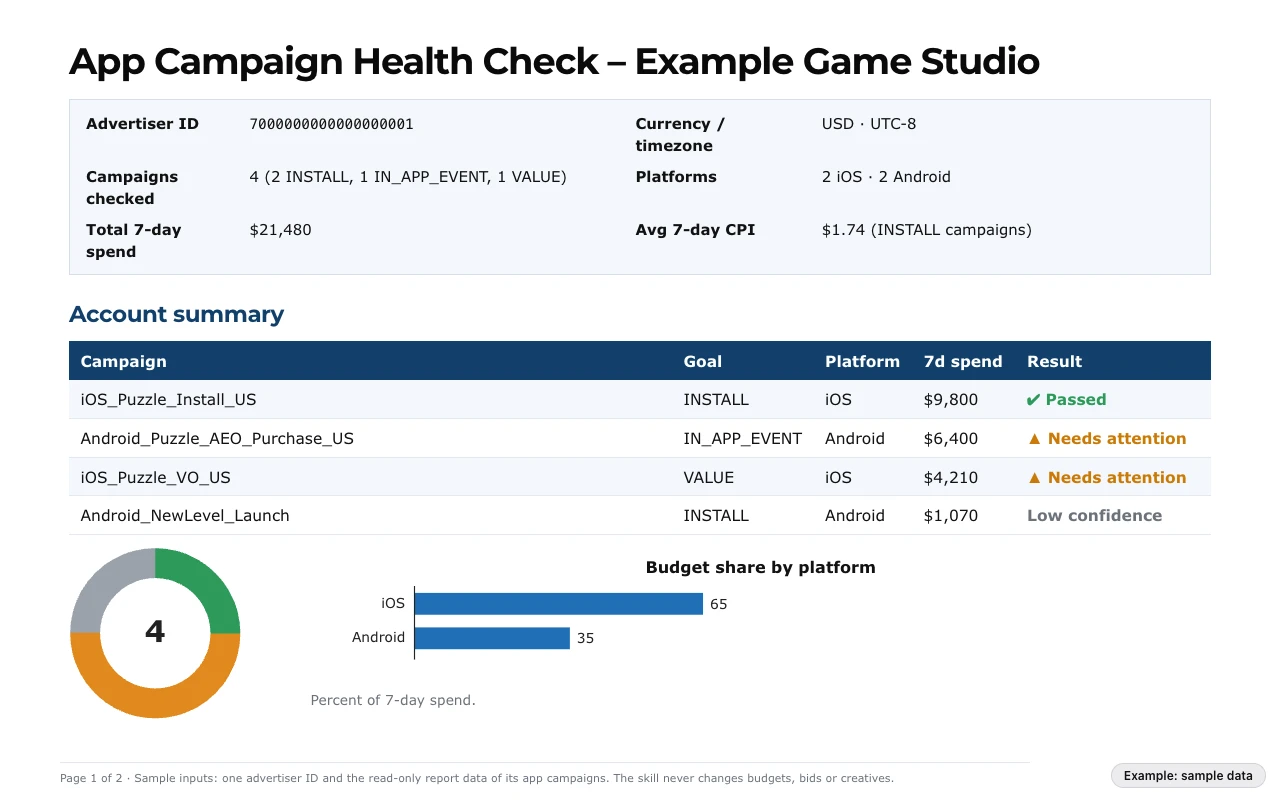
Full health check
Run app-gaming-best-practice for advertiser_id=[your advertiser ID]. Check every app promotion campaign and tell me which ones pass and which need attention.
You get: An account summary, then for each campaign a pass or needs-attention result with evidence and 1 to 3 suggested actions.
Is my budget enough?
Use app-gaming-best-practice on advertiser_id=[your advertiser ID]. Is the daily budget of each app campaign enough (about 50 times cost per install or 20 times cost per action), and are the bids healthy?
You get: A budget and cost check per campaign, with the numbers behind each finding.
Creative fatigue check
My game's cost per install has risen lately. Use app-gaming-best-practice on advertiser_id=[your advertiser ID], platform [iOS, Android or all]. Check creative fatigue, how many creatives each campaign has, and the last two days of spend and cost trends.
You get: Fatigue and creative count findings per campaign and a suggestion such as adding a few new creatives.
Ready to scale?
I want to scale my best app campaigns. Use app-gaming-best-practice on advertiser_id=[your advertiser ID]. Have my in-app event and value campaigns passed the learning phase (50 conversions in 7 days) and is attribution reporting working?
You get: A learning-phase result per campaign and a note on app and tracking setup.
Choose your AI assistant, then follow the video to add this skill to it step by step.
Ready to try Check your TikTok app install campaigns against best practices?
Source: from TikTok Agentic Hub