Check your TikTok app purchase campaigns that use a ROAS target
Reads your Smart+ app campaigns set to in-app purchases and a ROAS target, and checks setup, budget and creatives.
Updated
- Free
- Ready in one click
- Needs a TikTok Ads connection
- 1
Download skill
Click the button
- 2
Add to your assistant
A few steps below
- 3
Paste a prompt
Fill in, get your answer
From guesswork to a clear answer
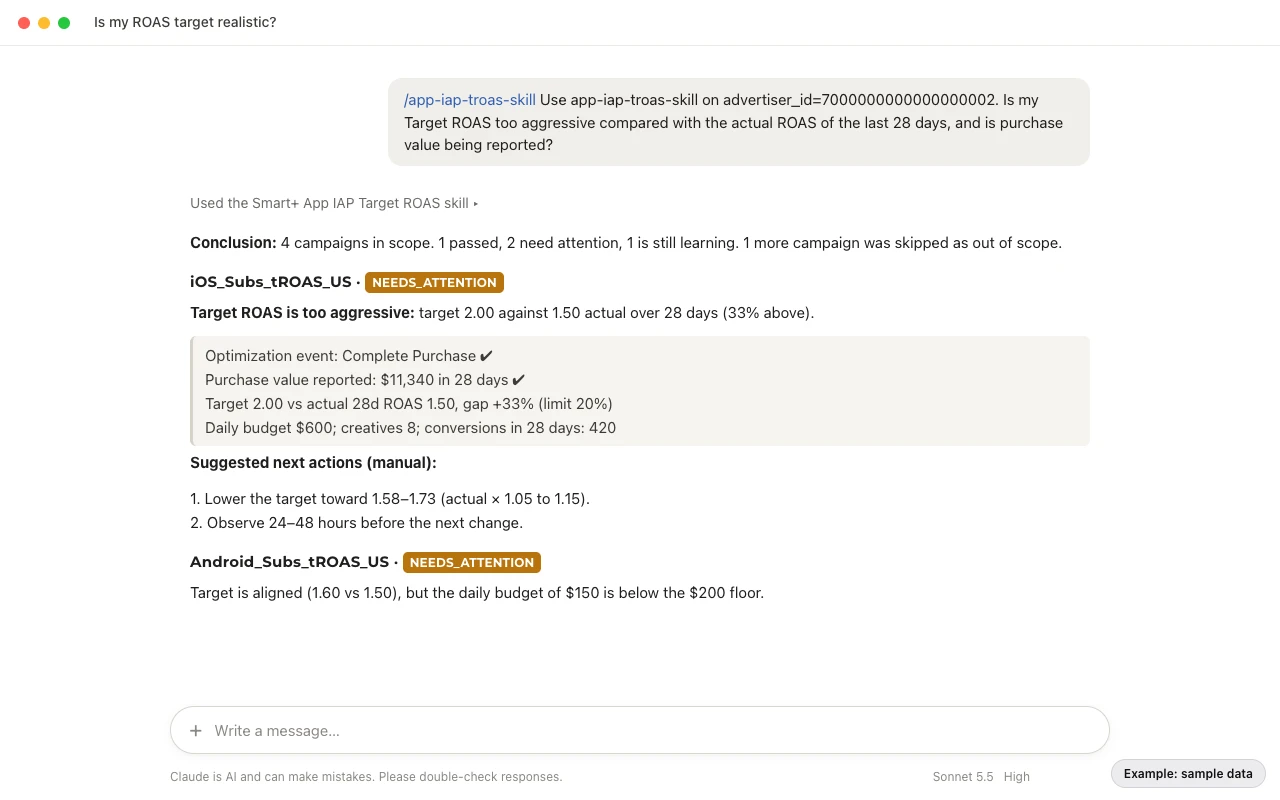
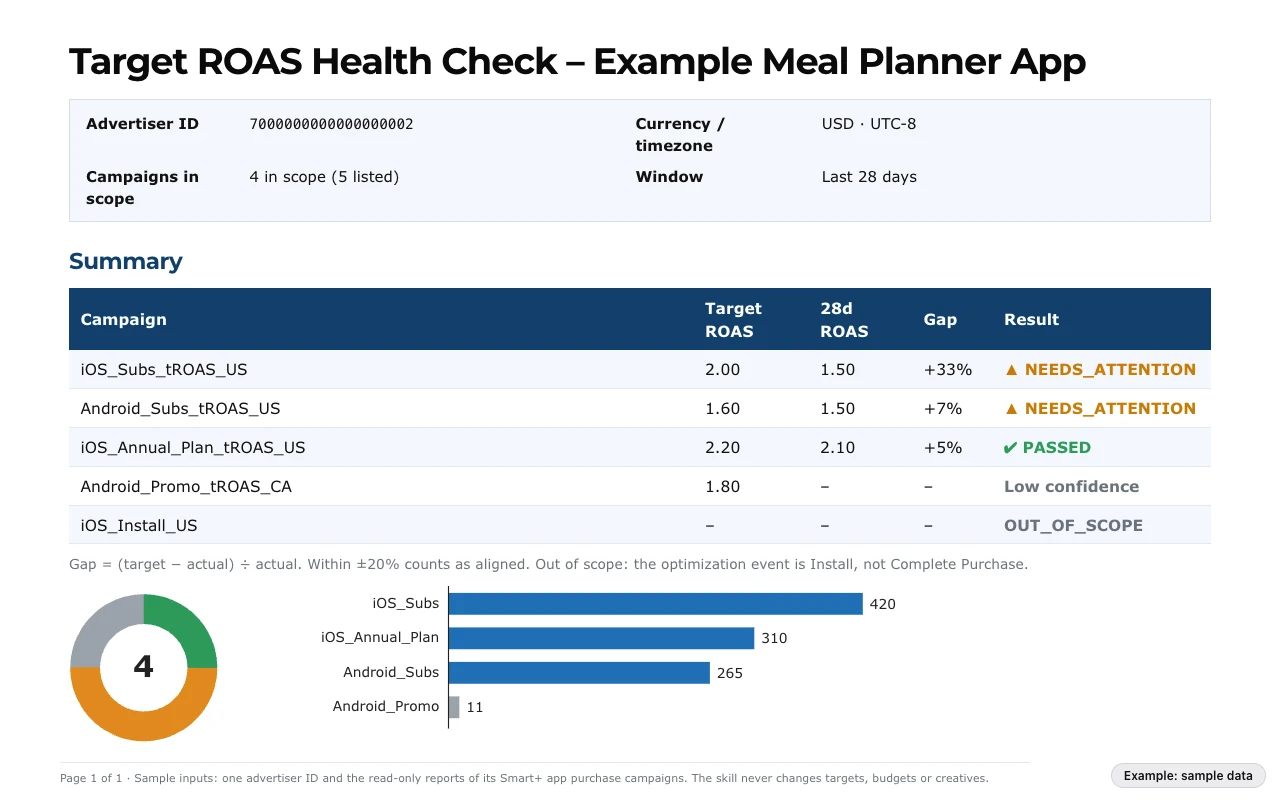
You get the target compared with the last 28 days of actual ROAS, with a within-range, too high or too low result.
Before: You are unsure if your ROAS target is too high or too low for what the campaign really earns.
You get a check that the optimization event is Complete Purchase and that purchase value is being reported.
Before: You do not know if purchase value is reaching TikTok at all.
You get the daily budget, creative count and learning-phase status checked, with low-confidence labels on thin data.
Before: You cannot tell if budget and creatives are enough to get through learning.
Made for
- Advertisers of apps with in-app purchases (for example games and subscriptions) who bid with a ROAS target on TikTok
- Marketers who want a regular health check on Smart+ app purchase campaigns
- Teams that want a written list of fixes before changing a target or budget
Not made for
- Advertisers whose campaigns do not use Smart+ app promotion, purchase events and a ROAS target: they are reported as out of scope
- Anyone who wants the skill to change targets, budgets or creatives for them: it only reads
What you need
- AI assistantAn AI assistant that lets you add skills.
- Account or accessA connection from your AI assistant to your TikTok Ads account (a tool link, often called an MCP server) that can read your campaigns and reports. It only reads: it is written never to pause, edit or upload anything. Setting up this connection can be tricky; the Ecomdy team can help you set it up.
- Your numbersYour TikTok Ads advertiser ID (a long number). Write in English, or in Chinese if you want Chinese answers. The campaigns need purchase value reported to show a real ROAS.
- Optional extra · optionalResults are firmer after a campaign has run 7 days and has at least 25 conversions. Earlier results are marked low confidence.
Replace the [brackets] with your own details, then paste it into your AI assistant.
Health check my campaigns
Run app-iap-troas-skill for advertiser_id=[your advertiser ID]. Check my app in-app purchase campaigns that use a Target ROAS and tell me what needs attention.
You get: One conclusion per campaign, 3 to 5 pieces of evidence and 1 to 3 suggestions you carry out by hand.
Is my ROAS target realistic?
Use app-iap-troas-skill on advertiser_id=[your advertiser ID]. Is my Target ROAS too aggressive compared with the actual ROAS of the last 28 days, and is purchase value being reported?
You get: The target compared with actual ROAS, flagged as aligned, too aggressive or too conservative, plus a value-reporting check.
Is budget enough to learn?
Use app-iap-troas-skill on advertiser_id=[your advertiser ID]. Is the daily budget enough, do I have at least 6 creatives, and has each campaign passed the learning phase?
You get: Budget, creative count and learning-phase results per campaign, marked low confidence when data is thin.
Choose your AI assistant, then follow the video to add this skill to it step by step.
Ready to try Check your TikTok app purchase campaigns that use a ROAS target?
Source: from TikTok Agentic Hub