Find out why TikTok and your app tracker report different counts
Paste your app's TikTok and tracker numbers and learn whether they can be compared and what is still unknown.
Updated
- Free
- Ready in one click
- Works in a plain chat
- 1
Download skill
Click the button
- 2
Add to your assistant
A few steps below
- 3
Paste a prompt
Fill in, get your answer
From guesswork to a clear answer
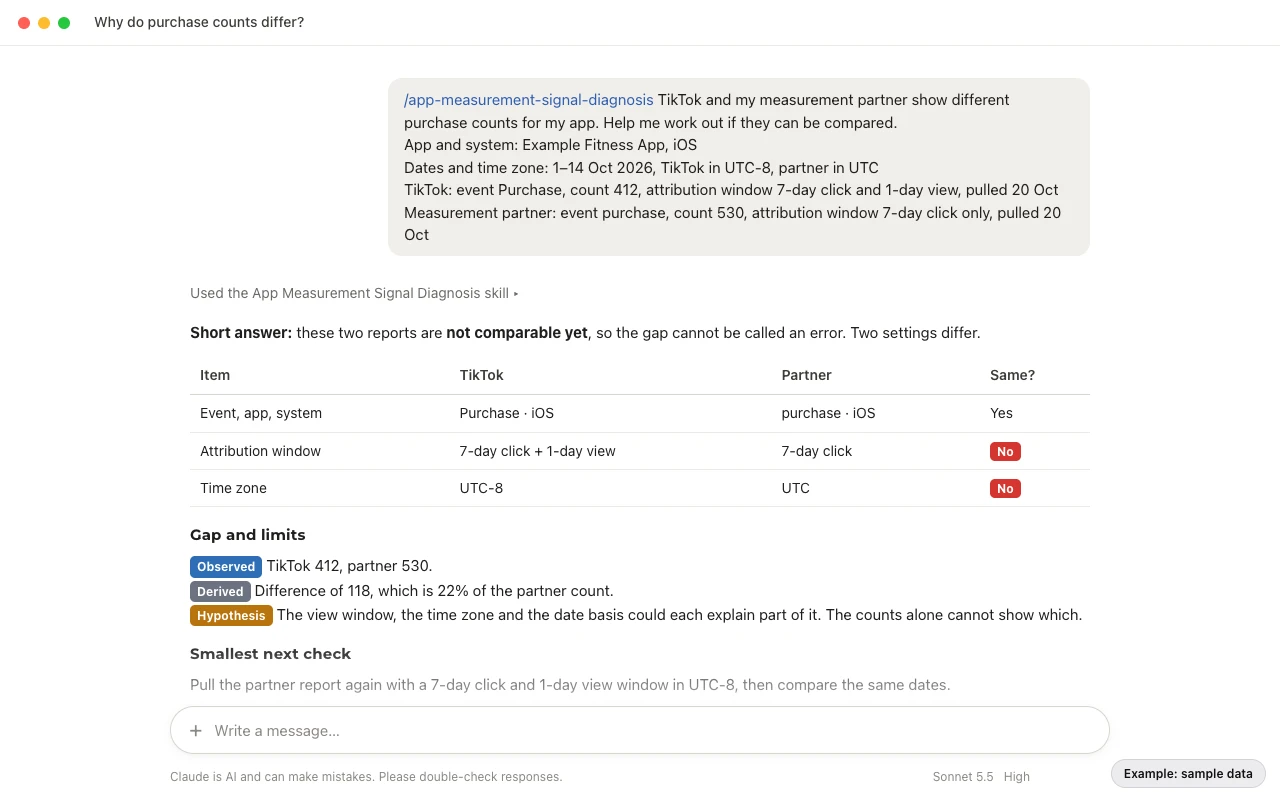
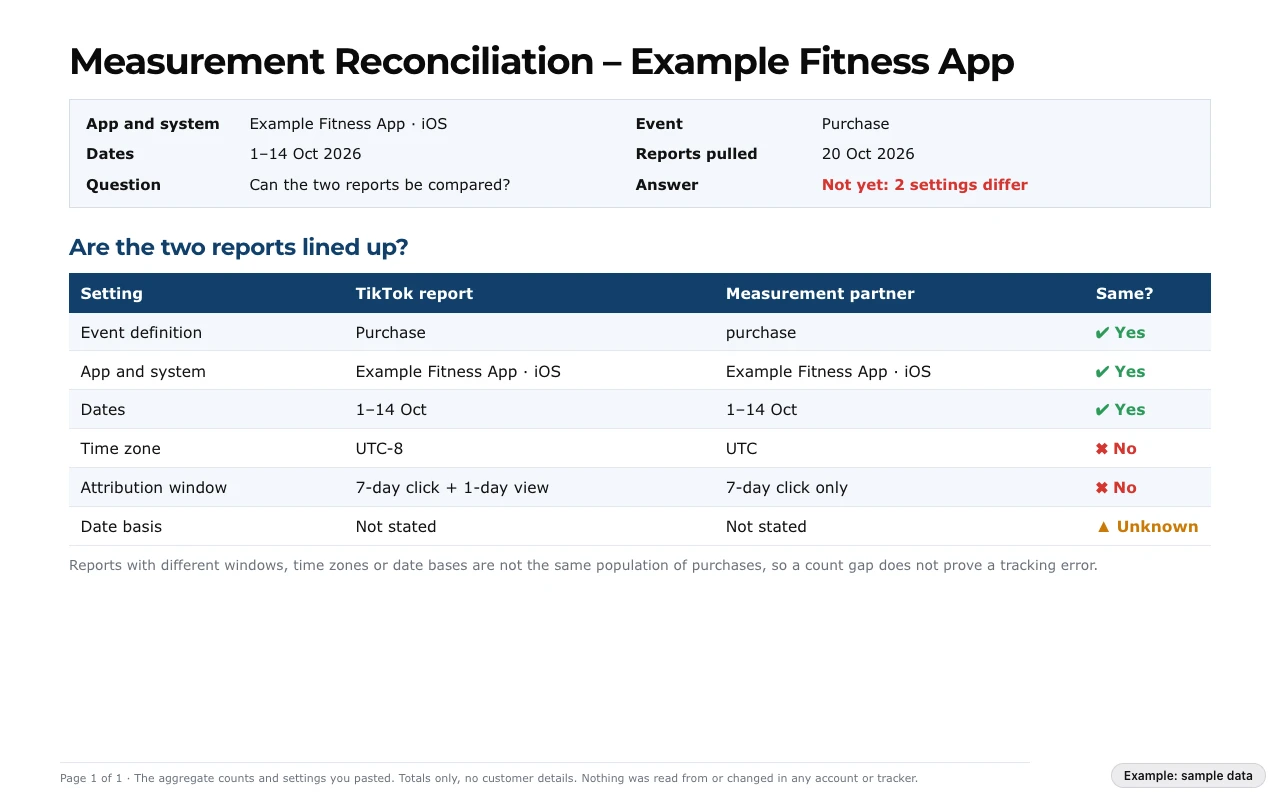
You get both reports lined up by event, dates, time zone and attribution window, so you see if they can be compared at all.
Before: TikTok and your measurement partner show different purchase counts.
You get the stages you supplied compared with your own earlier baseline, with what is supported kept apart from guesses.
Before: Installs held steady but purchases fell and you do not know where to look.
You get a short check plan: what to verify, who owns it, what would prove it and when to look again.
Before: You changed your app tracking setup and are not sure it worked.
Made for
- Advertisers running TikTok ads for a mobile app on iOS or Android
- Teams that use a measurement partner next to TikTok reporting
- Marketers who must explain a gap in install or purchase counts to a client or boss
Not made for
- People who want step-by-step repair instructions for their tracker or SDK: the skill leaves those out
- People who expect it to read or change their ad account or tracker
- Anyone selling only on a website with no app: the skill is for app campaigns
- People who want a bid or budget number: it gives none
What you need
- AI assistantAn AI assistant that lets you add skills.
- Your numbersFor each source (TikTok and your measurement partner): the event name (for example purchase), the app and phone system (iOS or Android), the dates, time zone, attribution window (how long after a click or view a purchase still counts), the count, and when the report was pulled. Totals only, no customer details.
- Optional extra · optionalOptional: when you last changed your tracking setup and what changed, plus a short summary of your tracker's event setup or any error message (remove links and keys).
Replace the [brackets] with your own details, then paste it into your AI assistant.
Why do the purchase counts differ?
TikTok and my measurement partner show different purchase counts for my app. Help me work out if they can be compared.
App and system: [app name, iOS or Android]
Dates and time zone: [dates, time zone]
TikTok: event [name], count [number], attribution window [clicks/views, days], report pulled on [date]
Measurement partner: event [name], count [number], attribution window [clicks/views, days], report pulled on [date]
You get: A check of whether the two reports are comparable, the size of the gap, what is observed versus guessed, and the smallest next check.
Installs stable, purchases down
My installs are stable but purchases fell. Tell me what my numbers can and cannot show.
Period now and earlier period: [dates]
Installs: [now] vs [earlier]
Registrations (if tracked): [now] vs [earlier]
Purchases: [now] vs [earlier]
What changed in the app or setup: [describe or none]
You get: The earliest stage that got worse, a limited explanation tied to what you shared, and what data is still missing.
Did my tracking fix work?
I changed my app tracking setup and want to check it worked.
What I changed and when: [describe]
How I will judge success: [metric and review window]
Counts before the change: [numbers and dates]
Counts after the change: [numbers and dates]
You get: A status (pending, inconclusive or supported), same-definition evidence, and one owner-ready next action.
Choose your AI assistant, then follow the video to add this skill to it step by step.
Ready to try Find out why TikTok and your app tracker report different counts?
Source: from TikTok Agentic Hub