Check your TikTok Smart+ website campaign settings and results
Reads your TikTok Ads account to inspect Smart+ website campaign settings and what the reports show when conversions or costs change.
Updated
- Free
- Ready in one click
- Needs a TikTok Ads connection
- 1
Download skill
Click the button
- 2
Add to your assistant
A few steps below
- 3
Paste a prompt
Fill in, get your answer
From guesswork to a clear answer
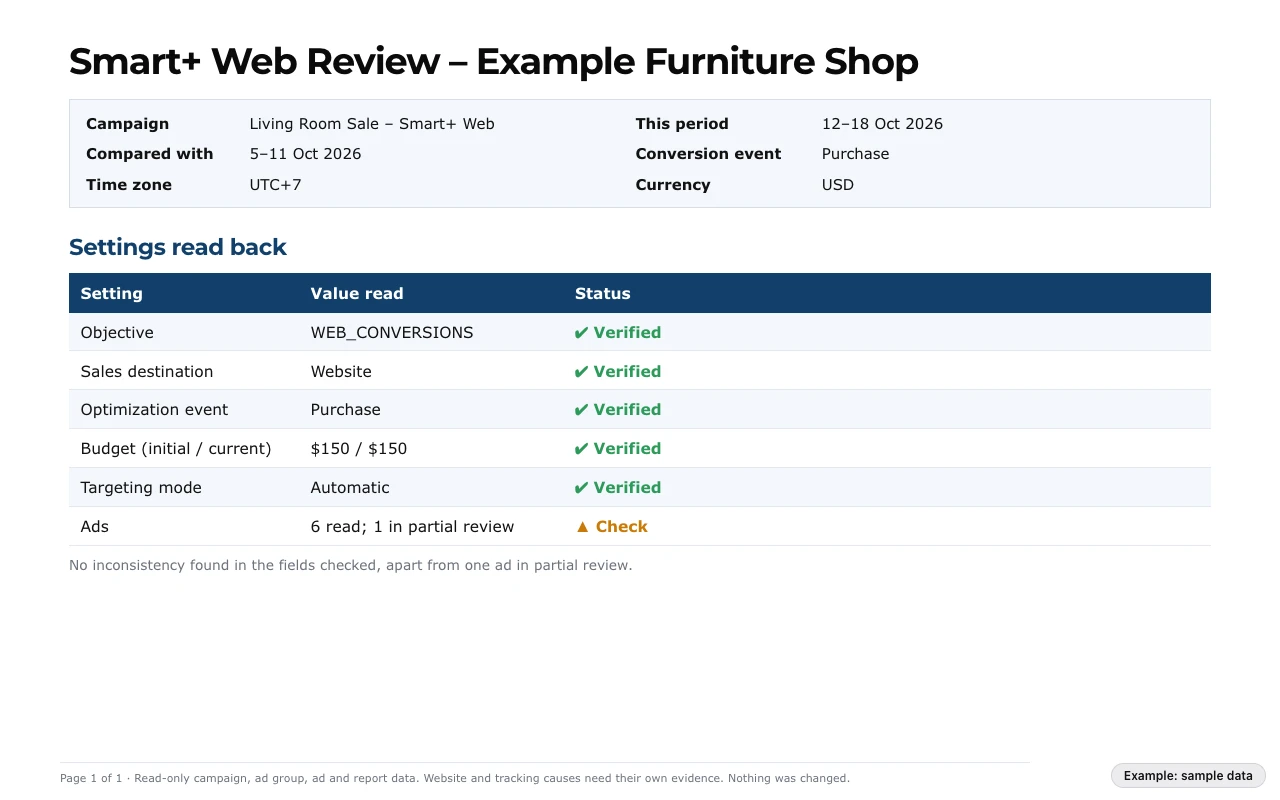
You get the campaign, ad group and ad settings read back, with any clear inconsistency named.
Before: You wonder if your Smart+ website campaign is set up correctly.
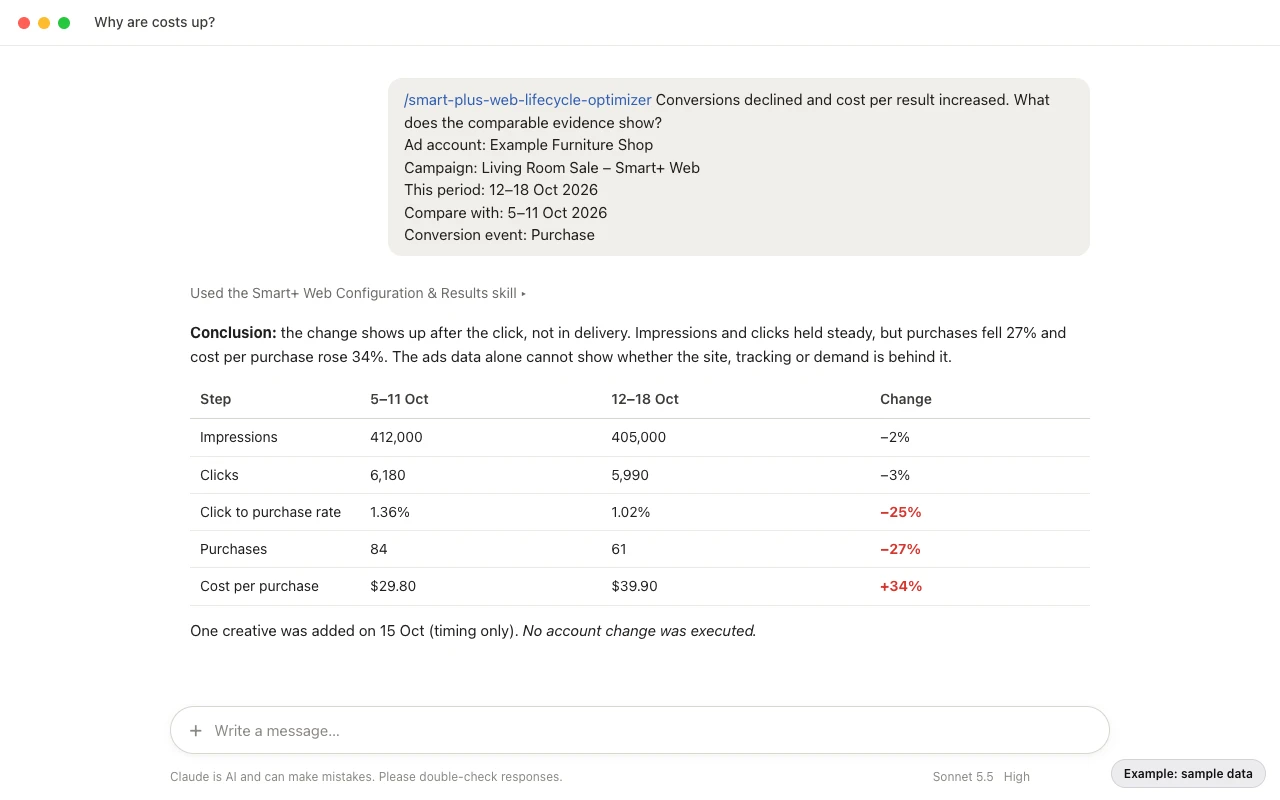
You get matching report windows compared, with supported drivers and evidence gaps listed.
Before: Conversions fell and your cost per result rose, and you do not know why.
You get a table of your current settings, what is verified, and what still needs a manual check.
Before: You are about to move to the upgraded version and are unsure what to check.
Made for
- Advertisers running TikTok Smart+ campaigns that send people to a website
- Ad operators who need to explain a rise in cost per result
- Teams preparing to move to the upgraded Smart+ and checking settings first
Not made for
- Anyone running App or Lead-only campaigns: they are outside this skill
- Anyone who wants Cost Cap or budget change recipes or an expected lift
- Anyone who wants the skill to edit the campaign for them
What you need
- AI assistantAn AI assistant that lets you add skills.
- Account or accessA connection from your AI assistant to your TikTok Ads account (a tool link, often called MCP) that can read Smart+ campaigns, ad groups, ads and reports. The skill only reads: it never changes your account, and you make every change by hand. You need access to the ad account. Ecomdy can help you set the connection up.
- Your numbersWhich ad account and campaign to check. For a results question, add the dates to compare, the account time zone, and the conversion event you count. Share your cost target if you want a test planned. For video questions, name the video.
- Optional extra · optionalNotes on website changes, tracking problems or recent edits to the campaign. The ads data alone cannot show a website or tracking cause.
Replace the [brackets] with your own details, then paste it into your AI assistant.
Check my settings
Are there configuration issues in this Smart+ website campaign?
Ad account: [ad account name or ID]
Campaign: [campaign name or ID]
Read the campaign, ad groups and ads and tell me what looks inconsistent.
You get: The settings it read, any evidenced inconsistency or blocker, or a note that nothing was found in the fields checked.
Why are costs up?
Conversions declined and cost per result increased. What does the comparable evidence show?
Ad account: [ad account name or ID]
Campaign: [campaign name or ID]
This period: [dates]
Compare with: [dates]
Conversion event: [event]
You get: A conclusion, the data and definitions used, differences from delivery to conversion, supported causes and evidence gaps.
Before the upgrade
Which settings should I verify before moving to the upgraded Smart+?
Ad account: [ad account name or ID]
Campaign: [campaign name or ID]
You get: A table of current values, what is known about the upgraded version, and the manual checks still open.
Which videos to check
Which videos should I look at first in this campaign?
Ad account: [ad account name or ID]
Campaign: [campaign name or ID]
Dates: [dates]
You get: Video results for the dates, and which ones need a closer look, with no claim that a drop proves fatigue.
Choose your AI assistant, then follow the video to add this skill to it step by step.
Ready to try Check your TikTok Smart+ website campaign settings and results?
Source: from TikTok Agentic Hub