Find where your qualified leads drop off, from form to sale
Paste your lead counts for two periods and get the earliest stage that fell, who should look at it, and what to check before changing any setup.
Updated
- Free
- Ready in one click
- Works in a plain chat
- 1
Download skill
Click the button
- 2
Add to your assistant
A few steps below
- 3
Paste a prompt
Fill in, get your answer
From guesswork to a clear answer
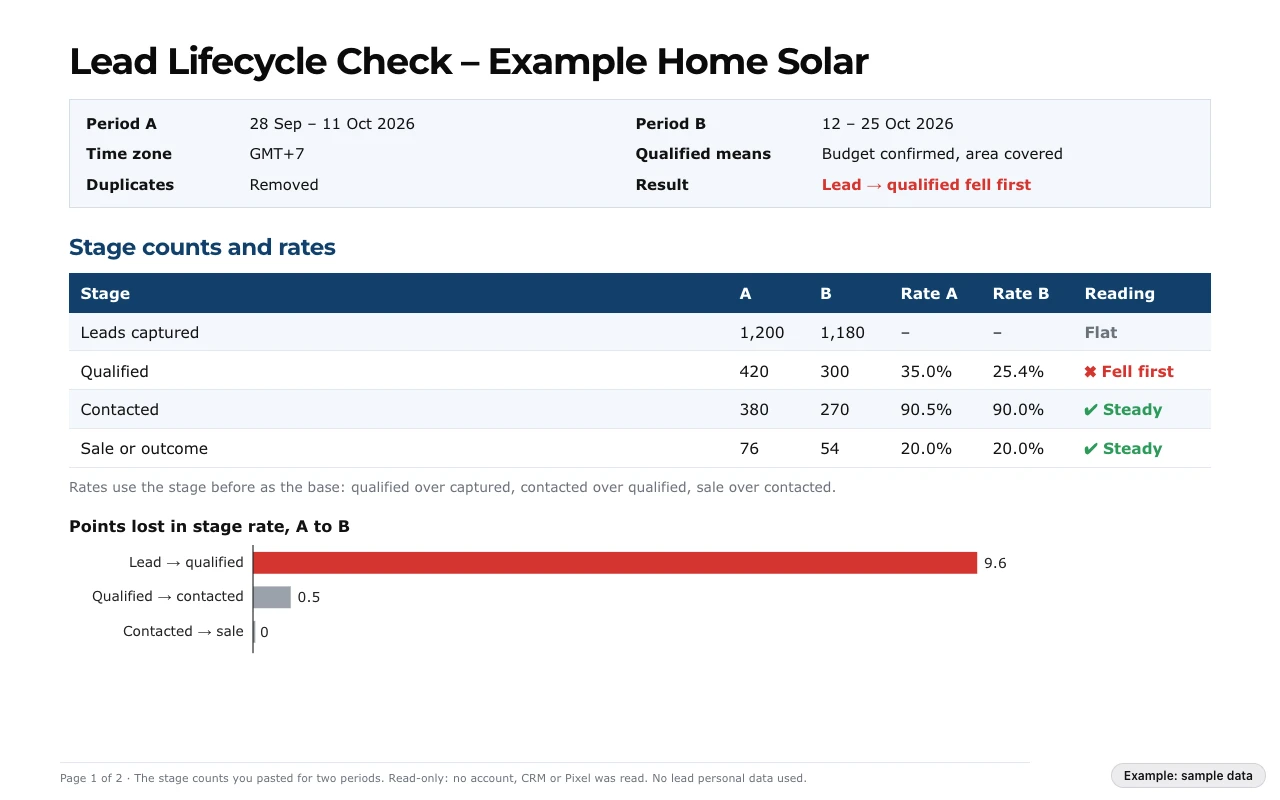
You see which stage fell first: the ad and form, the qualification step, or sales follow-up.
Before: Your cost per lead looks steady but fewer leads turn out to be qualified.
You get the likely owner for the problem and one small manual check or action for them.
Before: You are not sure whether to blame the ads, the form or the sales team.
You get a plain check of whether a changed counting rule, not more customers, explains the rise.
Before: After a tracking or reporting change your conversions went up and you doubt it is real growth.
Made for
- Advertisers running lead generation ads that feed a CRM or a sales team
- Marketers who see qualified leads fall while cost per lead stays flat
- Anyone asking whether a custom website event or CRM event can be used to optimize ads
Not made for
- People who expect it to read or change their ad account, CRM or Pixel
- People who want help choosing between forms, chat or messaging channels: the skill leaves that out
- Anyone with no lead counts by stage to share
What you need
- AI assistantAn AI assistant that lets you add skills.
- Your numbersCounts for two comparable periods: leads captured, leads marked qualified, leads contacted and outcomes (for example sales). Say how each stage is defined, the dates and time zone, and whether duplicates are removed. Never paste names, emails or phone numbers.
- Optional extra · optionalWhat you know about your tracking setup: whether you send leads from a CRM (customer relationship management tool) or use a website Pixel, and any recent change to events or reports.
Replace the [brackets] with your own details, then paste it into your AI assistant.
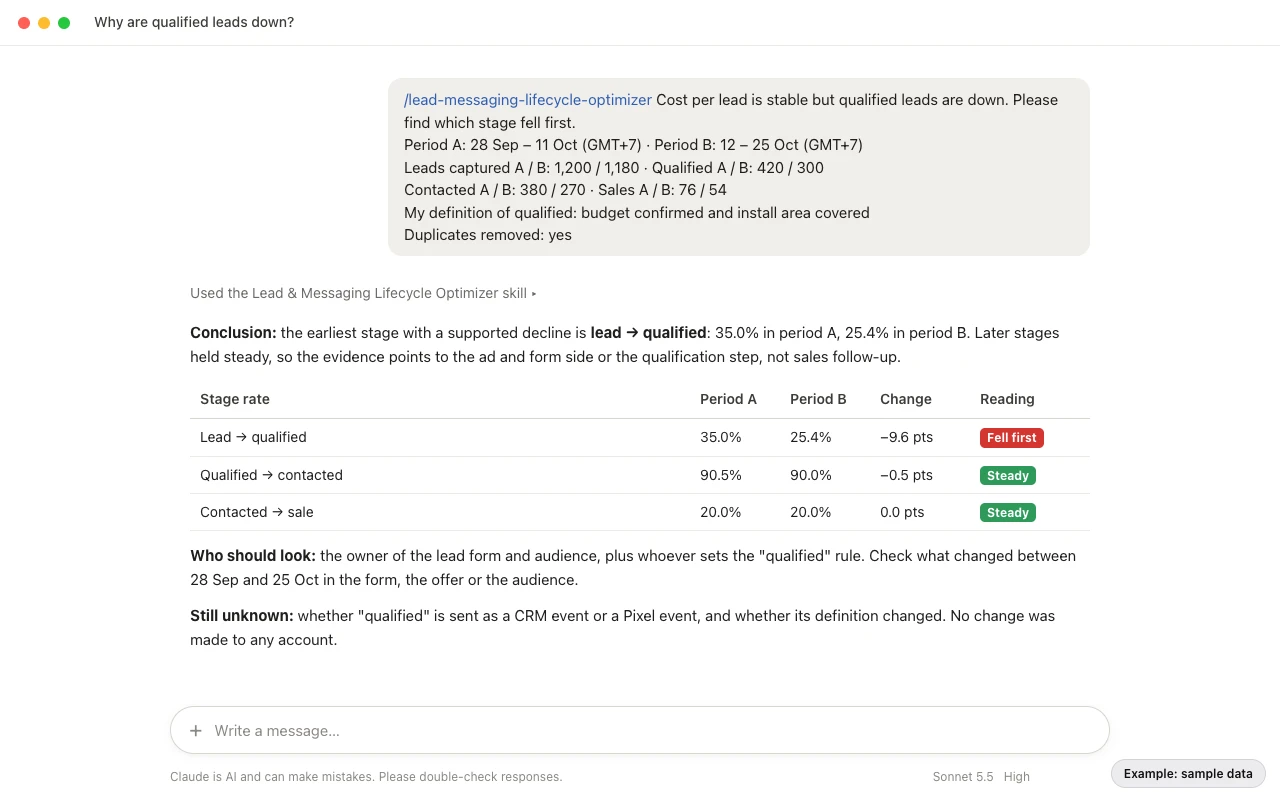
Why are qualified leads down?
Cost per lead is stable but qualified leads are down. Please find which stage fell first.
Period A: [dates, time zone]
Period B: [dates, time zone]
Leads captured A / B: [numbers]
Qualified leads A / B: [numbers]
Contacted A / B: [numbers]
Sales or other outcome A / B: [numbers]
How I define 'qualified': [definition]
Duplicates removed: [yes or no]
You get: Stage rates for both periods, the earliest stage with a supported decline, who should look into it, and what is still unknown.
Is it ads, form or sales?
Help me decide whether the problem is in the ads, the lead form or sales follow-up.
Lead counts by stage, last period: [numbers]
Lead counts by stage, this period: [numbers]
What changed in between: [form edits, new offer, new sales staff, tracking change...]
You get: A conclusion about which area the evidence points to, or a clear statement that the evidence is not enough, plus one next check.
Did my numbers really improve?
After a change to how my CRM leads are counted, conversions went up. Please check whether this is real growth.
Before: [conversions, dates, how counted]
After: [conversions, dates, how counted]
What was changed: [which stages or events are now included]
You get: A split between a change in what is counted and a change in real results, and whether the two periods can be compared.
Choose your AI assistant, then follow the video to add this skill to it step by step.
Ready to try Find where your qualified leads drop off, from form to sale?
Source: from TikTok Agentic Hub