Find out which account changes helped or hurt your TikTok ads
Reads your TikTok ad account's change log, compares results before and after each change and tells you how likely it is that the change made the difference.
Updated
- Free
- Ready in one click
- Needs a TikTok Ads connection
- 1
Download skill
Click the button
- 2
Add to your assistant
A few steps below
- 3
Paste a prompt
Fill in, get your answer
From guesswork to a clear answer
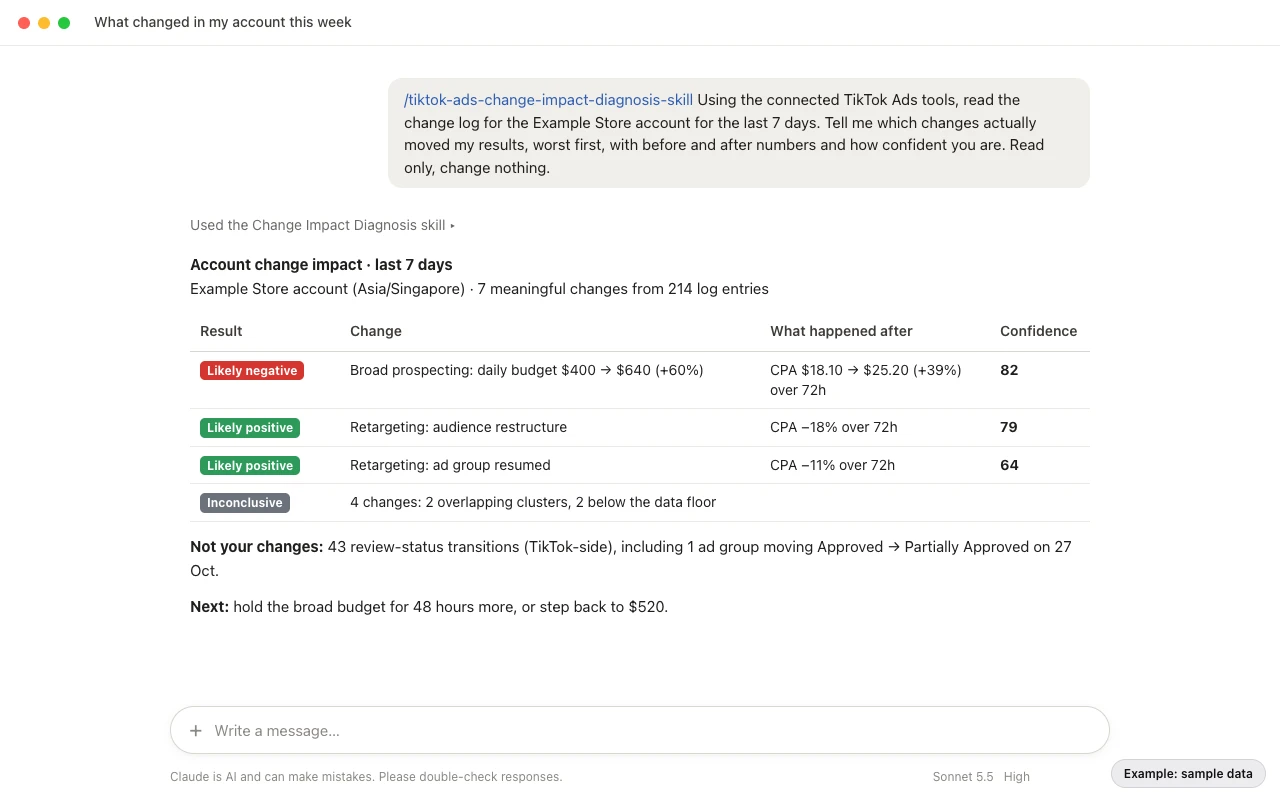
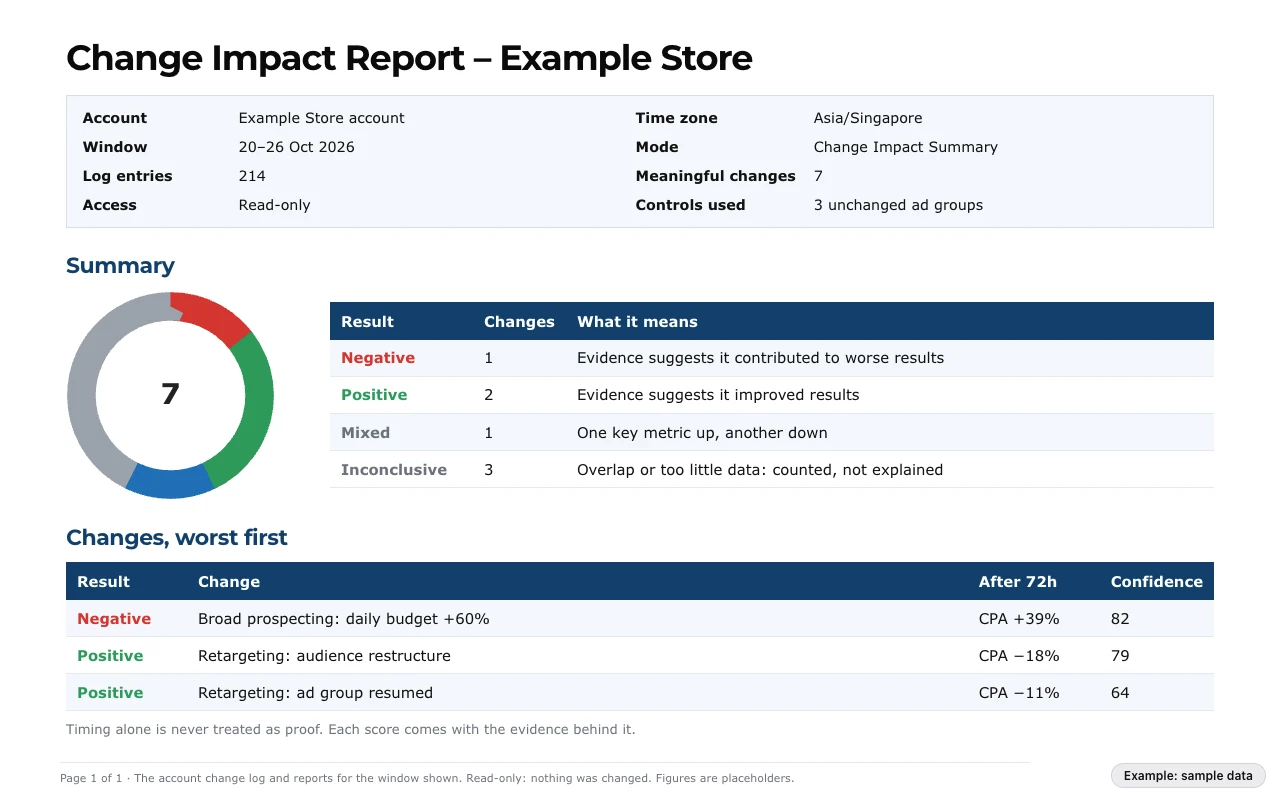
You get changes ranked by effect, worst first, with the before and after numbers for each and a score for how sure the skill is.
Before: You changed budgets, bids, targeting or ads this week and cannot tell which changes mattered.
You get the likely cause traced step by step (spend, clicks, conversion rate), checked against similar ad groups you did not touch.
Before: Your cost per result jumped and you wonder if it was something you did.
You get your own past changes of similar size with the number of cases shown, and a plain note when there is too little history to say.
Before: You are about to raise a budget and do not know if that worked before on this account.
Made for
- Advertisers who edit campaigns often and want to know what worked
- Media buyers and agencies explaining a results swing to a client
- Teams who want to check past budget changes before making the next one
Not made for
- Anyone who wants the skill to revert, pause or change budgets: it only reads and advises
- Accounts with very little spend: it will say it cannot score changes on a small number of conversions
- People who cannot connect their assistant to their TikTok Ads account or let it run small scripts
What you need
- AI assistantAn AI assistant that lets you add skills.
- Account or accessA connection from your AI assistant to your TikTok Ads account (usually called an MCP connection) that can read campaigns, reports and the account change log, plus an assistant that can run the included Python 3 scripts. The skill only reads and creates export tasks, and never edits budgets or settings, but check the access you grant. The Ecomdy team can help you set it up.
- Your numbersWhich ad account and period you care about (default is the last 7 days, or 14 when investigating a result swing). For a swing, name the metric and the date. For a planned change, name the ad group, what you will change and by how much.
- Optional extra · optionalTell it about anything else that changed, such as a new landing page, price change or tracking change. The change log does not cover tracking or pixel setup.
Replace the [brackets] with your own details, then paste it into your AI assistant.
What changed this week?
Using the connected TikTok Ads tools, read the change log for my account [ad account ID] for the last [7] days. Tell me which changes actually moved my results, worst first, with before and after numbers and how confident you are. Read only, change nothing.
You get: A ranked summary: the account's time zone, the meaningful changes with metric moves and a 0-100 confidence score with reasons, and a separate line for TikTok-side events such as review changes.
Why did my CPA jump?
My cost per result on [campaign or ad group name] jumped around [date]. Was it something I changed? Check the 72 hours before, compare with similar ad groups I did not touch, and show how you reached your answer. Account: [ad account ID]. Read only.
You get: The time the change in results began, changes ranked by how likely they are the cause, the step-by-step chain, the comparison with unchanged ad groups and a confidence score. Timing alone is not treated as proof.
Check before I change a budget
I am thinking of raising the daily budget on [ad group] by [60]% in account [ad account ID]. Has a change like that worked before on this account? Show how many past cases you found. Read only, do not apply anything.
You get: Past budget changes of similar size with the number of cases, what happened afterwards, anything that failed before, and a note when there are too few cases to call it a pattern.
Choose your AI assistant, then follow the video to add this skill to it step by step.
Ready to try Find out which account changes helped or hurt your TikTok ads?
Source: from TikTok Agentic Hub