Clear old paused TikTok ads that never spent anything
It scans your ad account, shows what is old, paused and never spent, and removes it only after you confirm once.
Updated
- Free
- Ready in one click
- Needs a TikTok Ads connection
- 1
Download skill
Click the button
- 2
Add to your assistant
A few steps below
- 3
Paste a prompt
Fill in, get your answer
From guesswork to a clear answer
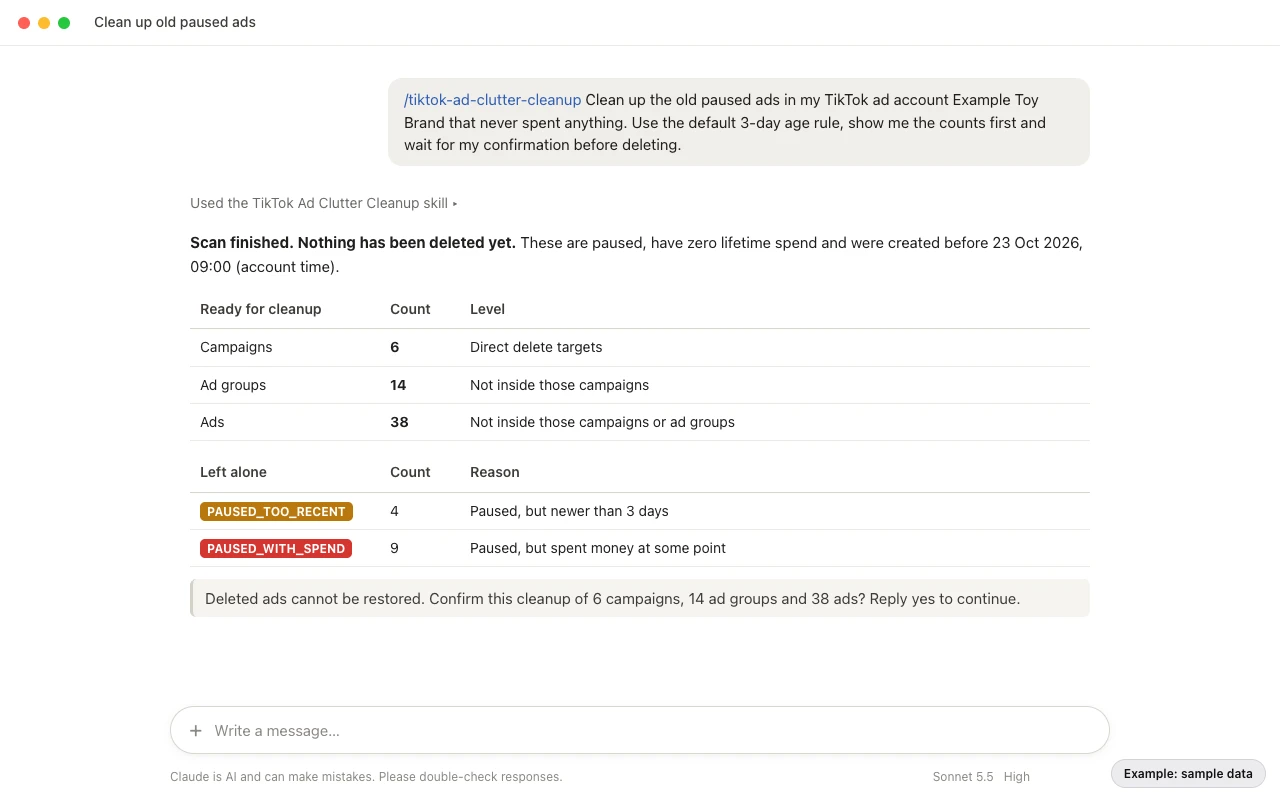
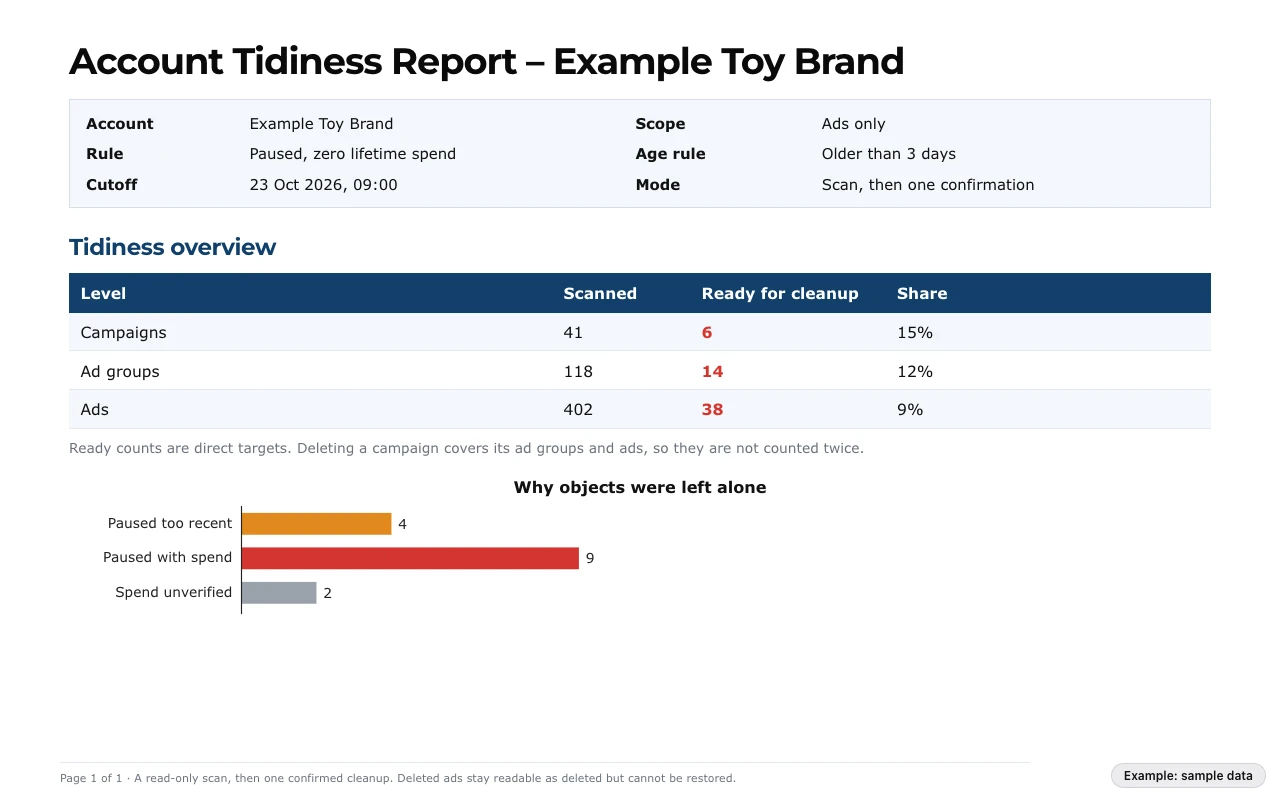
You get an overview of what is cluttering the account and why each item qualifies or does not.
Before: Your ad account is full of old paused campaigns, ad groups and ads.
Only ads that are paused, older than 3 days and have zero lifetime spend are selected.
Before: You are afraid of deleting something that ever spent money.
You confirm one short summary of counts, then it deletes and reads the result back.
Before: Cleaning up means opening and checking items one by one.
Made for
- Advertisers whose TikTok Ads Manager is crowded with unused paused ads
- Agencies tidying client accounts before a new campaign round
- TikTok Shop sellers with inactive GMV Max creatives piling up
Not made for
- Anyone who wants to pause ads because of poor results: it never touches active or spending ads
- People who want deleted ads restored: deletion cannot be undone
- Anyone without a connection to their TikTok Ads account: it cannot work from a plain chat
What you need
- AI assistantAn AI assistant that lets you add skills.
- Account or accessA connection from your AI assistant to your TikTok Ads account (an MCP connection, which lets the assistant read and act on your account directly). It first only reads, but after you confirm it CAN CHANGE the account: it deletes ads and removes GMV Max creatives, so you need ad management permission. Deletion cannot be undone. The Ecomdy team can help you set it up.
- Your numbersWhich ad account to clean (the advertiser ID or name). Optionally say Ads only or GMV Max only, or a different age than the default 3 days. Reply to the summary with a clear yes only if you agree with the counts.
- Optional extra · optionalFor GMV Max cleanup, access to the linked TikTok Shop store is also needed.
Replace the [brackets] with your own details, then paste it into your AI assistant.
Show what is cluttering my account
What is cluttering my TikTok ad account [advertiser ID or name]? Scan it and show me the tidiness overview: what is paused, old and never spent, what is too recent or has spend, and what can only be reported. Do not change anything until I confirm.
You get: A summary of counts: items ready for cleanup, items skipped and the reason for each, and a warning that deleted ads cannot be restored.
Delete old paused ads that never spent
Clean up the old paused ads in my TikTok ad account [advertiser ID or name] that never spent anything. Use the default 3-day age rule, show me the counts first and wait for my confirmation before deleting.
You get: One summary of how many campaigns, ad groups and ads would be deleted, then deletion after your yes and a check that they are gone.
Remove inactive GMV Max creatives
Remove the GMV Max creatives in my TikTok ad account [advertiser ID or name] that are not delivering, unavailable or inactive. Show me the counts and wait for my confirmation first. Leave ads alone.
You get: The creatives that can be removed, the rejected ones listed for you to handle in Ads Manager, and a follow-up check about 20 minutes later.
Choose your AI assistant, then follow the video to add this skill to it step by step.
Ready to try Clear old paused TikTok ads that never spent anything?
Source: from TikTok Agentic Hub