Copy your best TikTok campaigns into other ad accounts
Grade your campaigns, check each target account, then copy the chosen ones as paused copies you switch on yourself.
Updated
- Free
- Ready in one click
- Needs a TikTok Ads connection
- 1
Download skill
Click the button
- 2
Add to your assistant
A few steps below
- 3
Paste a prompt
Fill in, get your answer
From guesswork to a clear answer
You get paused copies of the campaign, ad groups and ads in each target account, checked level by level.
Before: You rebuild a winning campaign by hand in every new ad account.
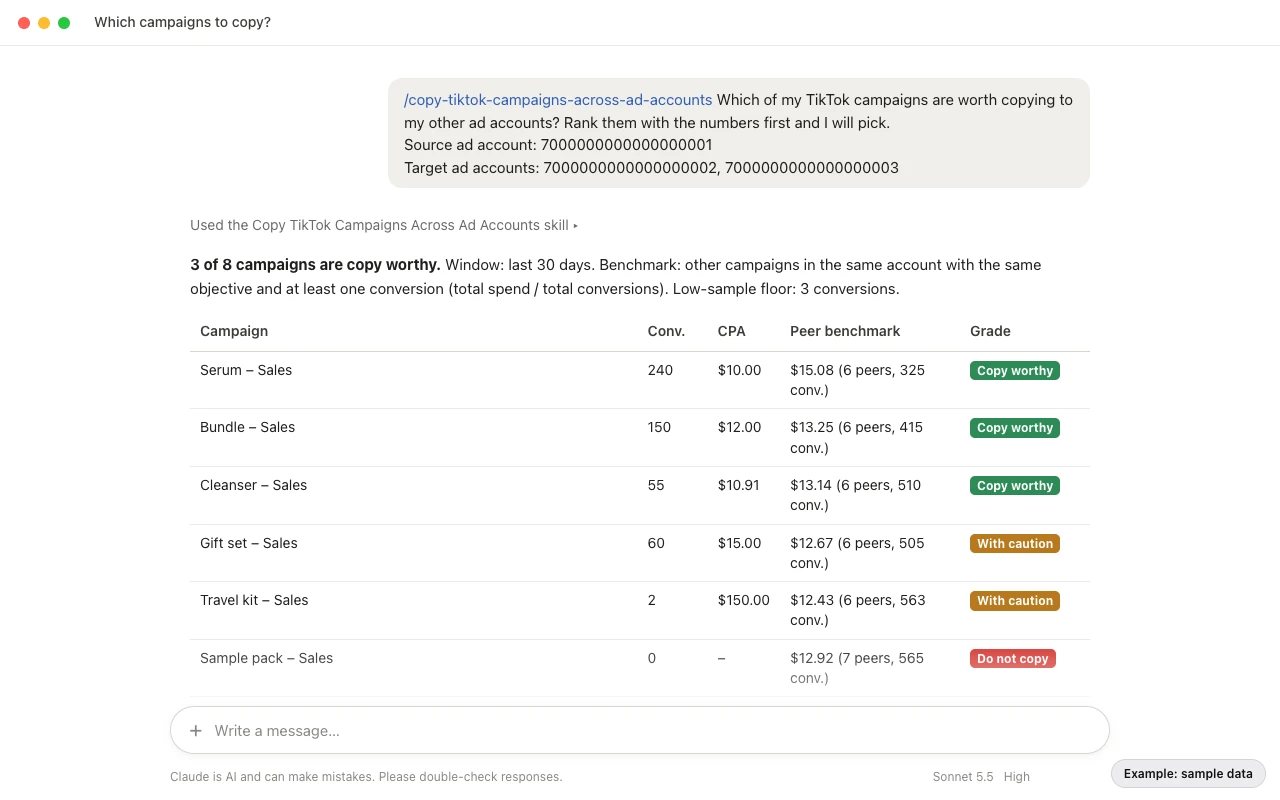
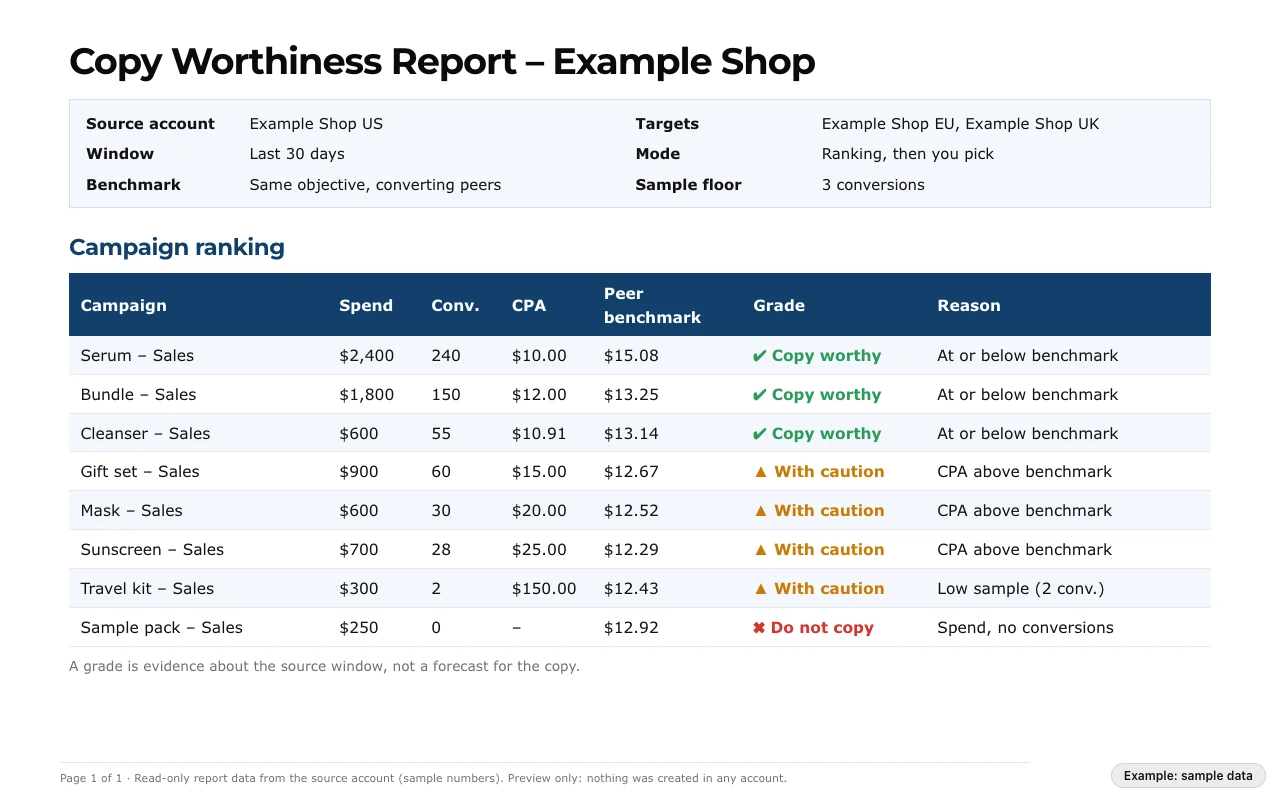
Each campaign is graded copy worthy, copy with caution or do not copy, with the numbers and sample size shown.
Before: You are not sure which campaigns are worth copying.
You get a readiness list for each target account: what can be linked or shared, what is left for you to do.
Before: You do not know what a new account is missing (Pixel, identity, audiences, creatives).
Made for
- Agencies and advertisers who run several TikTok ad accounts
- People who want to reuse a proven campaign in a new account
- Teams with Business Center admin rights who can connect their AI assistant to TikTok
Not made for
- Anyone copying inside one ad account: the skill says to use TikTok's own copy tool for that
- Anyone with GMV Max or Smart Creative (ACO) campaigns: these are not supported
- Anyone who does not want account changes: copies, Pixel links and asset sharing are real changes
What you need
- AI assistantAn AI assistant that lets you add skills.
- Account or accessA connection from your AI assistant to your TikTok Ads account (an MCP connection) that can read the source account and manage every target account. The skill CHANGES the accounts: it creates paused campaigns, ad groups and ads in the targets and can link a Pixel, assign a TikTok account identity and share creatives or audiences. Ecomdy can help you set it up.
- Your numbersThe source ad account ID, the campaigns to copy (or ask it to rank them), and the target ad account IDs. For a target in another currency, a budget in that currency. Say if you want a preview only.
- Optional extra · optionalFor Spark Ads (boosted posts), the post owner may need to give you an authorization code. A Business Center admin may need to approve some links.
Replace the [brackets] with your own details, then paste it into your AI assistant.
Rank, then I pick
Which of my TikTok campaigns are worth copying to my other ad accounts? Rank them with the numbers first and I will pick.
Source ad account: [source advertiser ID]
Target ad accounts: [target advertiser IDs]
You get: A grade for each campaign (copy worthy, with caution, do not copy) with the numbers behind it, then a wait for your choice. Nothing is created.
Preview only
Preview copying campaign [campaign ID] from advertiser [source ID] to advertiser [target ID]. Do not write anything. Show what the new account is missing and what you would create.
You get: A readiness check of the target account, the planned paused copies and the gaps you must fix. No changes are made.
Copy as paused
Copy campaign [campaign ID] from advertiser [source ID] to advertisers [target IDs]. Prepare the Pixel, creatives and audiences it can, and keep every copy paused.
You get: Paused copies created in each target and checked level by level, with a list of anything left for you to do. Turning them on is a separate step.
Choose your AI assistant, then follow the video to add this skill to it step by step.
Ready to try Copy your best TikTok campaigns into other ad accounts?
Source: from TikTok Agentic Hub