Check if your TikTok Shop is ready to scale GMV Max
Get a GO, FIX FIRST or NO-GO verdict on raising GMV Max spend, with a four-gate scorecard and a short list of ranked fixes.
Updated
- Free
- Ready in one click
- Needs a TikTok Ads connection
- 1
Download skill
Click the button
- 2
Add to your assistant
A few steps below
- 3
Paste a prompt
Fill in, get your answer
From guesswork to a clear answer
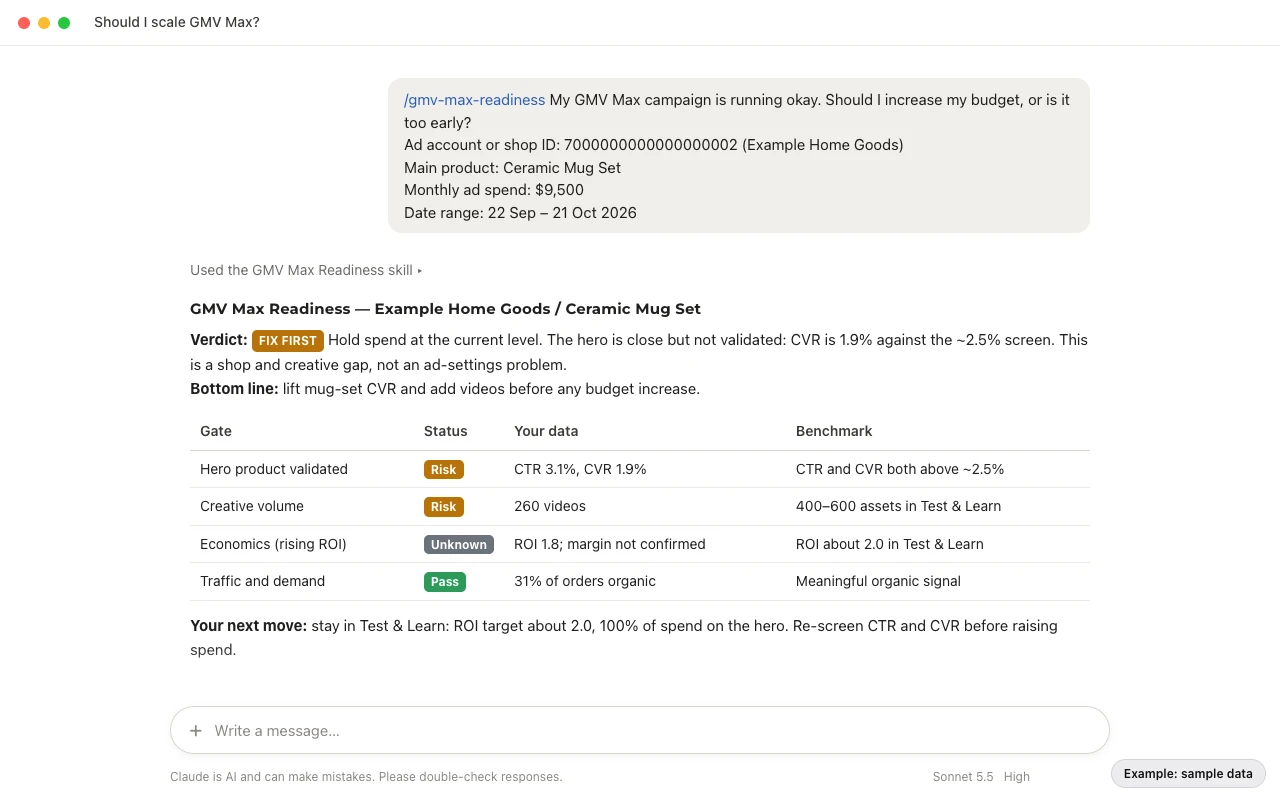
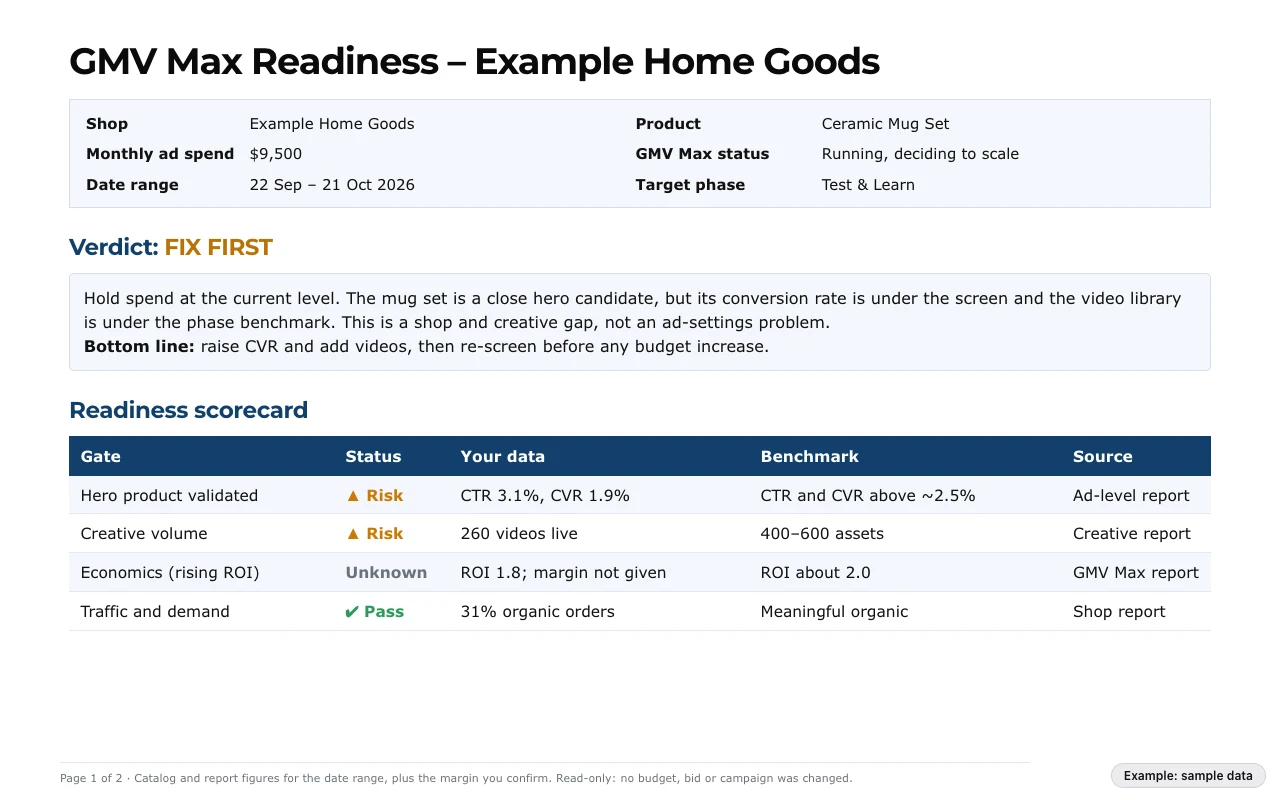
You get a GO, FIX FIRST or NO-GO verdict with the main reason and the one next step.
Before: You wonder whether to raise your GMV Max budget or whether it is too early.
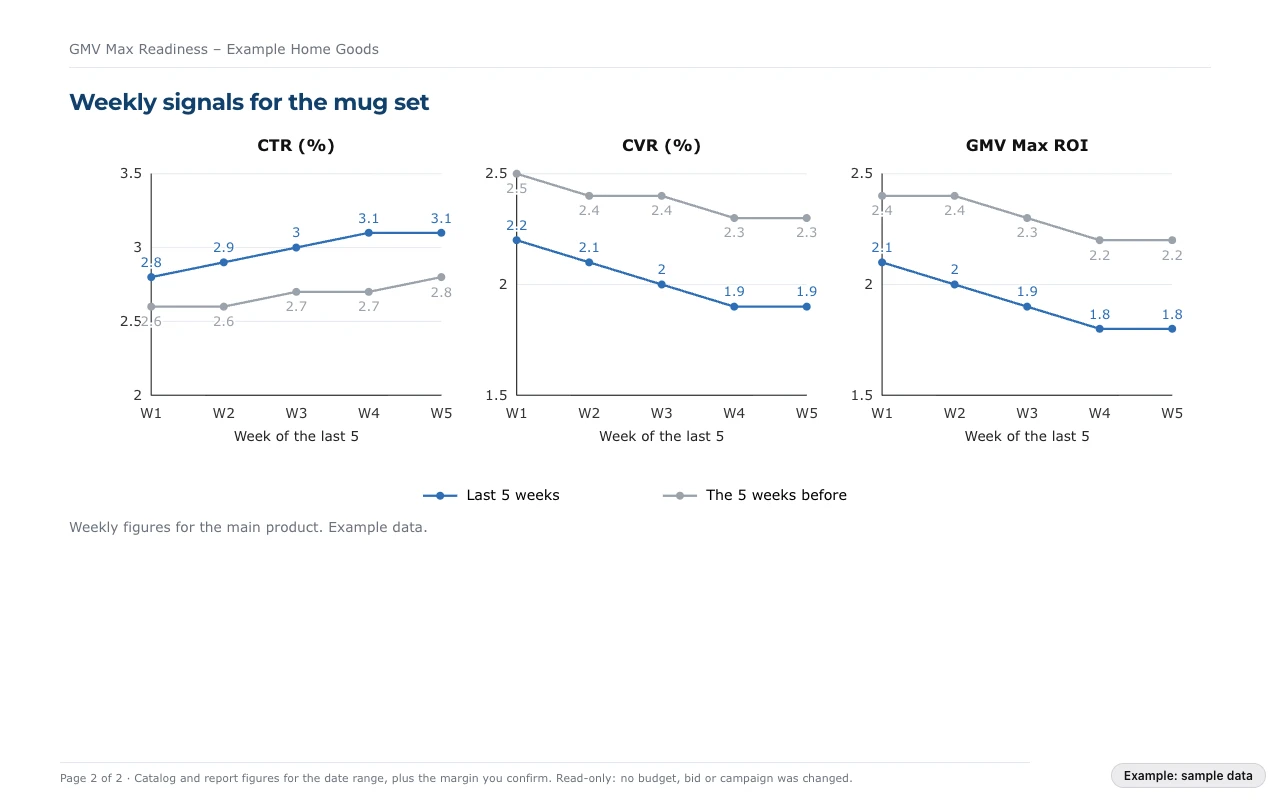
You see four readiness gates scored from your own data: hero product, creative volume, economics and traffic.
Before: Your GMV Max return is low and you blame the ad settings.
You get 1 to 3 fixes ranked by what blocks scaling most, each with an action and how to check it worked.
Before: You have a long list of things you could fix and no order.
Made for
- Small TikTok Shop sellers who run or plan to run GMV Max
- Sellers deciding whether to raise their GMV Max budget
- People who can connect their AI assistant to a TikTok Ads account
Not made for
- Large or managed sellers: the skill is written for small self-serve shops
- Anyone who wants the skill to change budgets or campaigns: it only reads and advises
What you need
- AI assistantAn AI assistant that lets you add skills.
- Account or accessA connection from your AI assistant to your TikTok Ads account (an MCP connection) that can read your Business Center, GMV Max campaigns, catalog and reports. The skill is read-only: its own files say it never creates, edits, pauses or spends. It does not work from a plain chat. Ecomdy can help you set up the connection.
- Your numbersYour shop or ad account ID, the product you want to scale, your current monthly ad spend, whether GMV Max is not running, running badly or about to scale, and a date range. Be ready to confirm your product margin.
Replace the [brackets] with your own details, then paste it into your AI assistant.
Should I scale?
My GMV Max campaign is running okay. Should I increase my budget, or is it too early?
Ad account or shop ID: [ID]
Main product: [product]
Monthly ad spend: [amount and currency]
Date range: [dates]
You get: A GO, FIX FIRST or NO-GO verdict, a four-gate scorecard with sources and the top fixes.
Low return: ads or shop?
My GMV Max return has been low and raising the budget is not helping. Is it my ad settings or something else?
Ad account or shop ID: [ID]
Main product: [product]
Date range: [dates]
You get: A check of hero product, creative volume, economics and traffic, and whether the gap is in the shop rather than the settings.
Is my shop ready?
I want to start scaling on GMV Max. Is my shop ready and do I have a product that is a good fit?
Ad account or shop ID: [ID]
Candidate product: [product]
Margin on that product: [percent]
You get: A start or do not start verdict, the target phase, a suggested return target and spend split.
Choose your AI assistant, then follow the video to add this skill to it step by step.
Ready to try Check if your TikTok Shop is ready to scale GMV Max?
Source: from TikTok Agentic Hub